# Multithreading – Parallel and Distributed Computing (Assignment 1)
**Three C + POSIX-threads workloads, each written in a serial, a pthreads, and a CPU-affinity version, with runtime, speedup and efficiency measured on a 4-thread laptop.**
[](https://github.com/rohaan2802/Multithreading)
[](https://github.com/rohaan2802/Multithreading)
[](https://github.com/rohaan2802/Multithreading)
[](https://github.com/rohaan2802/Multithreading)
[](LICENSE)
---
## Live Links
| What | Link |
|------|------|
| Repository | [https://github.com/rohaan2802/Multithreading](https://github.com/rohaan2802/Multithreading) |
| Website (GitHub Pages) | [https://rohaan2802.github.io/Multithreading/](https://rohaan2802.github.io/Multithreading/) |
| Releases page | [https://github.com/rohaan2802/Multithreading/releases](https://github.com/rohaan2802/Multithreading/releases) |
---
## Table of Contents
1. [Live Links](#live-links)
2. [Overview](#overview)
3. [What's Inside](#whats-inside)
4. [The Three Workloads](#the-three-workloads)
5. [Task 1 – SUSY Logistic Scoring](#task-1--susy-logistic-scoring)
6. [Task 2 – Sparse Matrix–Vector Multiply](#task-2--sparse-matrixvector-multiply)
7. [Task 3 – BFS on a Web Graph](#task-3--bfs-on-a-web-graph)
8. [Version Matrix](#version-matrix)
9. [Experimental Setup](#experimental-setup)
10. [Performance Results](#performance-results)
11. [Profiling with gprof](#profiling-with-gprof)
12. [Correctness](#correctness)
13. [Large Files (Release Downloads)](#large-files-release-downloads)
14. [Folder Structure](#folder-structure)
15. [How to Use This Repository](#how-to-use-this-repository)
16. [Compiling and Running](#compiling-and-running)
17. [Screenshots](#screenshots)
18. [License](#license)
19. [Author](#author)
---
## Overview
This repository is my first assignment for Parallel and Distributed Computing at FAST-NUCES (Spring 2026). The brief is a revision of POSIX threads and performance: take three problems that behave differently — a regular, compute-heavy loop, an irregular sparse multiply, and a pointer-chasing graph search — and implement each of them three ways.
- **V1** is a single-threaded baseline.
- **V2** uses pthreads and leaves scheduling to the operating system.
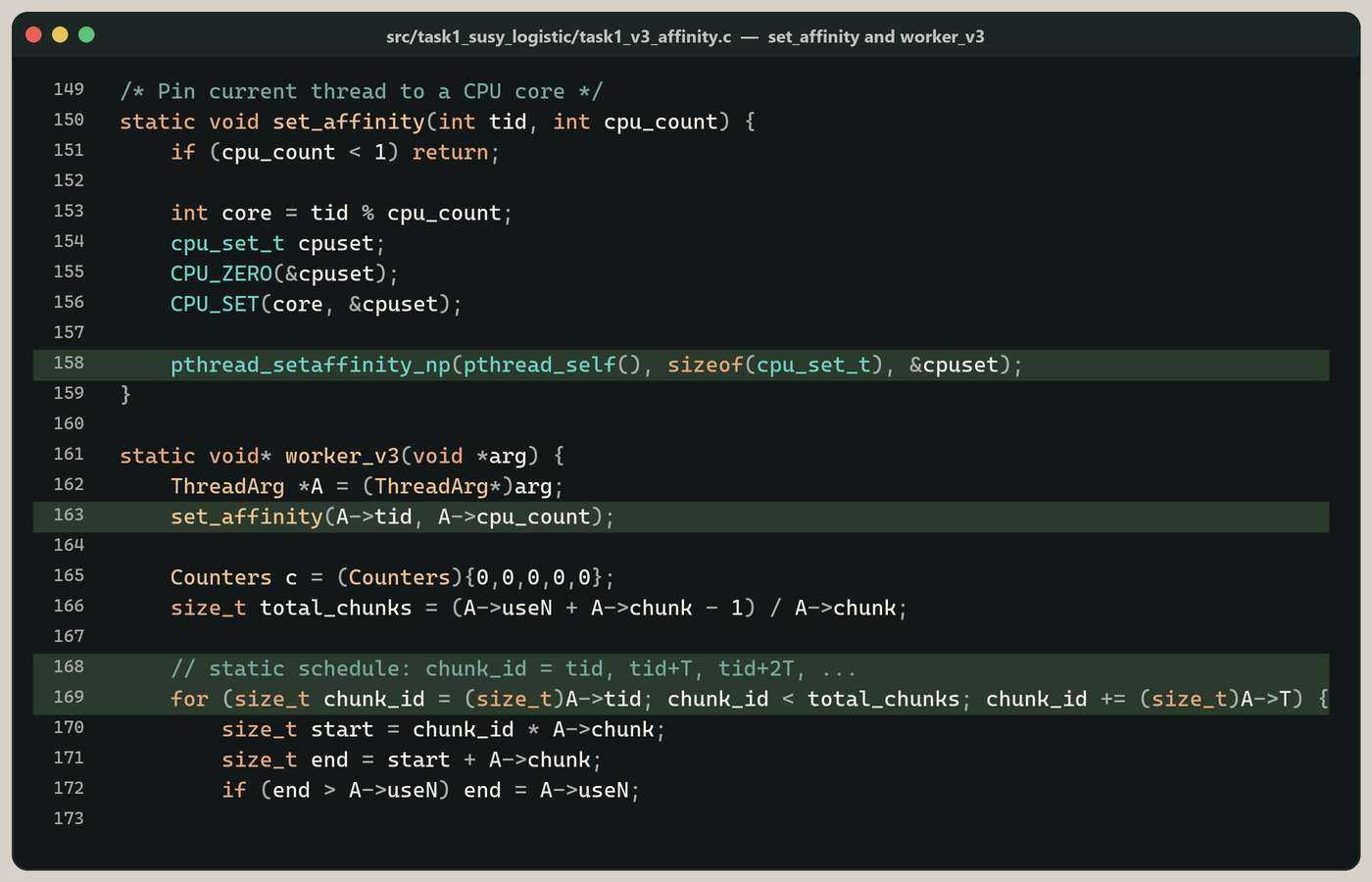
- **V3** also uses pthreads, but pins each thread to a core with `pthread_setaffinity_np` and hands out work in a static chunk schedule.
I timed every combination, computed speedup and efficiency, profiled the V3 programs with gprof, and wrote up the results in the report under `assignment/`. The only allowed language is C (C++ is also permitted by the brief) and the only allowed parallel library is Pthreads — no OpenMP, TBB, or `std::thread`.
> Course: **Parallel and Distributed Computing** · Semester: **Spring 2026** · Roll: **22I-2327** · Section: **F**
---
## What's Inside
| Section | Folder | Contents |
|---------|--------|----------|
| Source | [src/task1_susy_logistic](src/task1_susy_logistic), [src/task2_spmv](src/task2_spmv), [src/task3_bfs](src/task3_bfs) | Nine C programs (V1 / V2 / V3 for each task), gprof dumps and result workbooks |
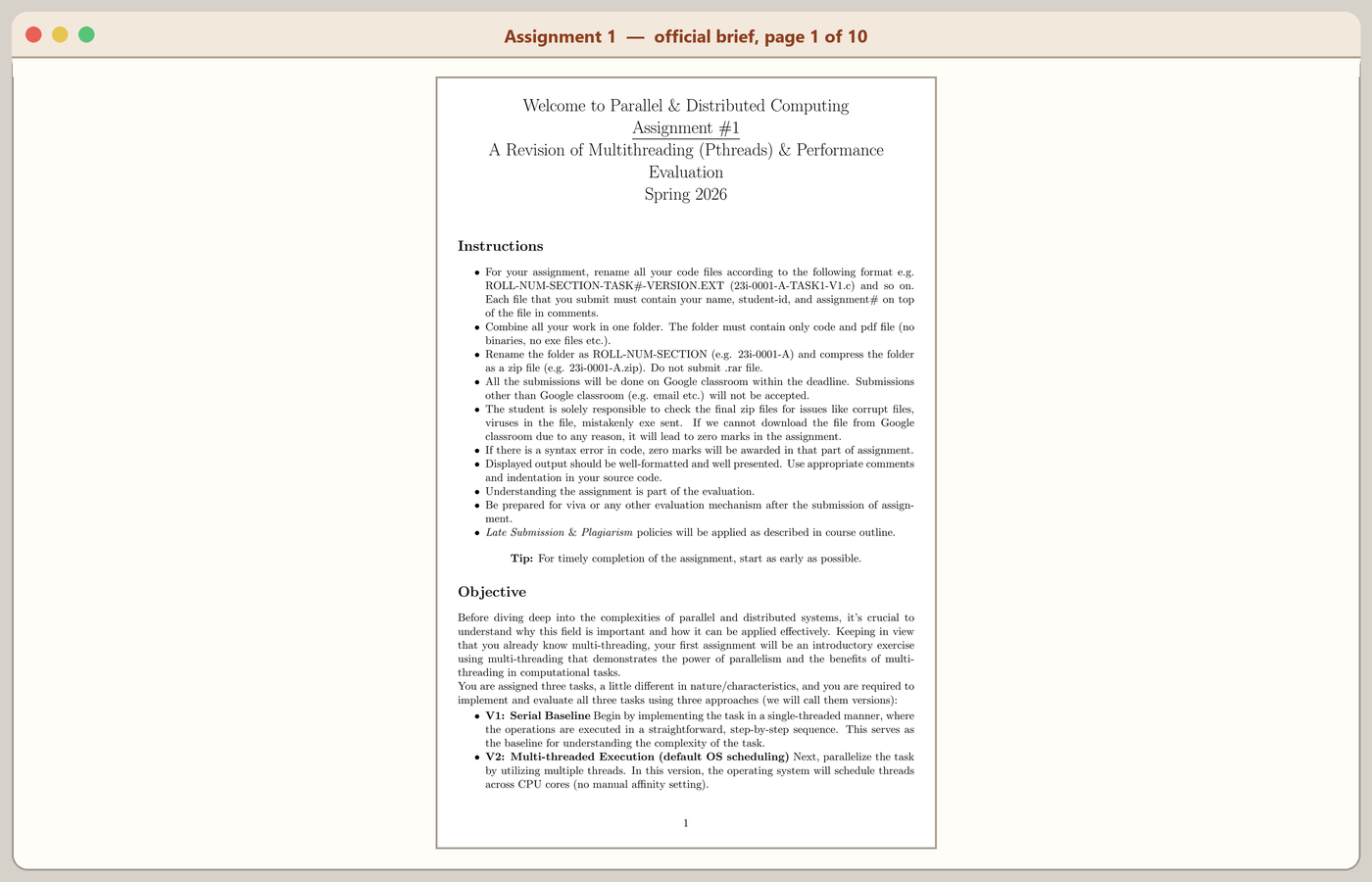
| Assignment | [assignment](assignment) | Official brief, instructions, and my report |
| Datasets | [datasets](datasets) | Compressed `webbase-1M` and `web-Google` archives, plus a short README |
| Release assets | [release](release) | Local home of the large SUSY zip (not committed — see [below](#large-files-release-downloads)) |
| Website | [index.html](index.html), [assets](assets) | GitHub Pages site, styles, screenshots |
| Build | [Makefile](Makefile), [scripts](scripts) | Compile and dataset-extract helpers |
---
## The Three Workloads
| Task | Kernel | Dataset | Why it is different |
|------|--------|---------|---------------------|
| 1 | Dense logistic-style scoring (18 features + a fixed bias) | SUSY CSV ([UCI](https://archive.ics.uci.edu/dataset/279/susy)) | Regular, compute-bound, contiguous floats |
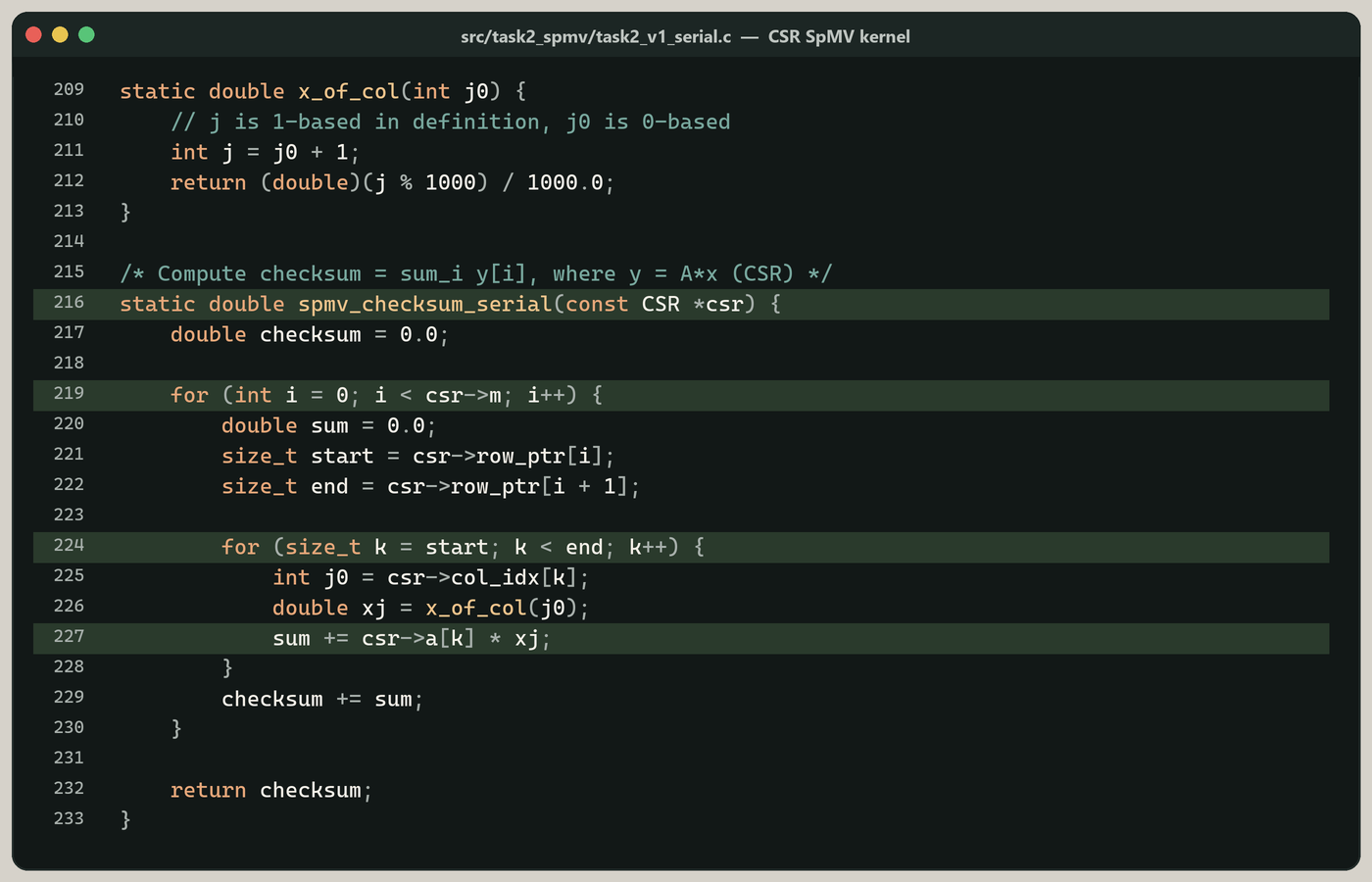
| 2 | Sparse matrix–vector multiply (COO → CSR, then `y = Ax`) | `webbase-1M.mtx` ([SuiteSparse](https://sparse.tamu.edu/Williams/webbase-1M)) | Irregular memory, work split on CSR row chunks |
| 3 | Breadth-first search from node 0 | SNAP `web-Google.txt` ([SNAP](https://snap.stanford.edu/data/web-Google.html)) | Frontier-based, pointer chasing, harder to scale |
Each program is timed over three deterministic input sizes — the first 10%, the first 50%, and the full dataset — and five trials at each size. Timing uses `clock_gettime(CLOCK_MONOTONIC)` and covers the compute kernel only (file parsing and CSR construction sit outside the timed region).
---
## Task 1 – SUSY Logistic Scoring
**Files:** [`task1_v1_serial.c`](src/task1_susy_logistic/task1_v1_serial.c), [`task1_v2_pthreads.c`](src/task1_susy_logistic/task1_v2_pthreads.c), [`task1_v3_affinity.c`](src/task1_susy_logistic/task1_v3_affinity.c)
Each row of the SUSY CSV is a label `y` (signal or background) followed by 18 numeric features. The program applies a **fixed** logistic model — the weights are given in the brief, they are not learned here:
- Bias `b = -0.35`
- Weights `w[1..18] = [0.12, -0.07, 0.05, 0.09, -0.11, 0.03, 0.08, -0.02, 0.06, 0.04, -0.05, 0.10, -0.08, 0.07, 0.02, -0.03, 0.11, -0.06]`
- Score `s = b + Σ w_i x_i`, probability `p = 1 / (1 + e^{-s})`, prediction `1` if `p >= 0.5` else `0`
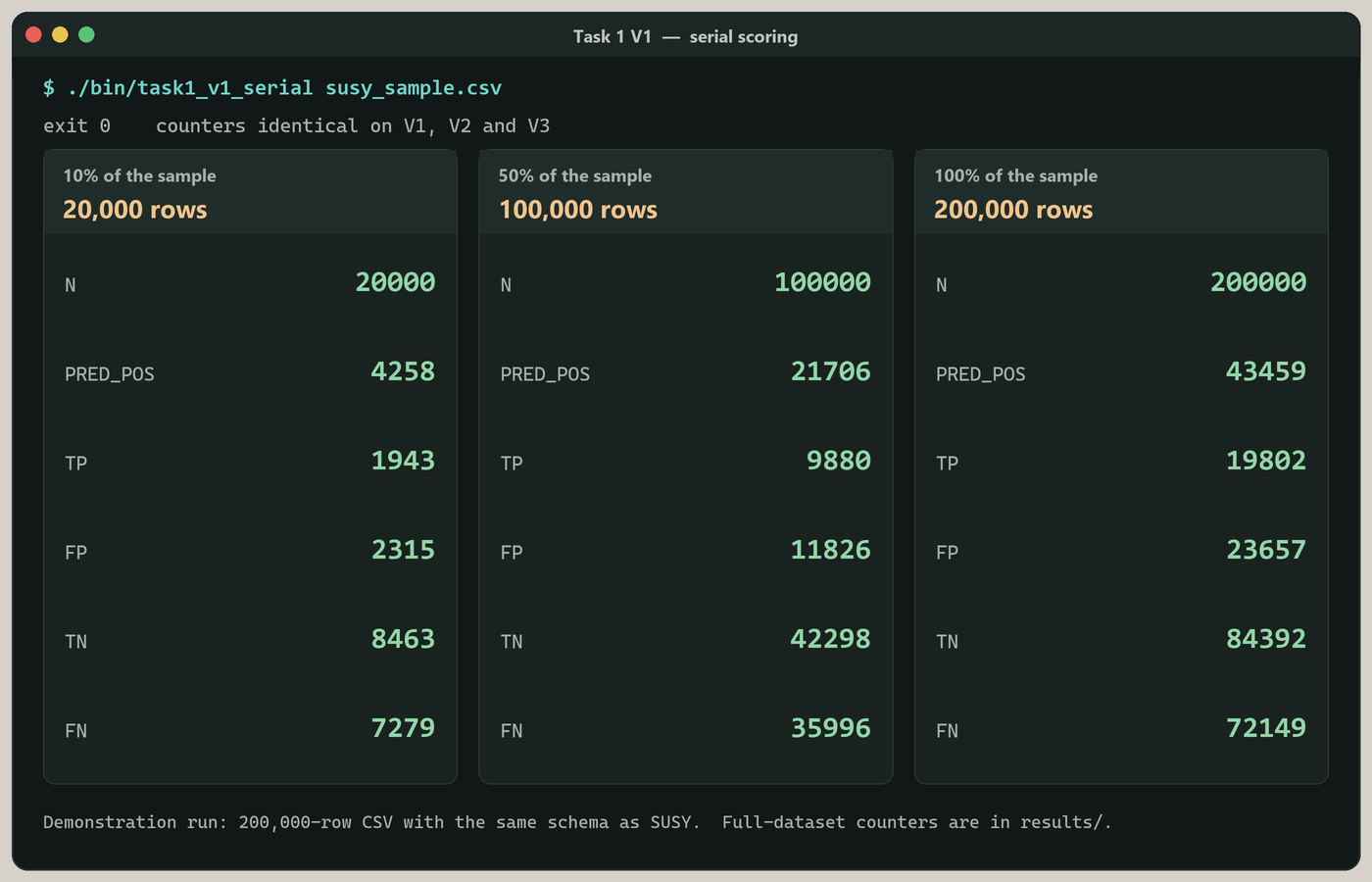
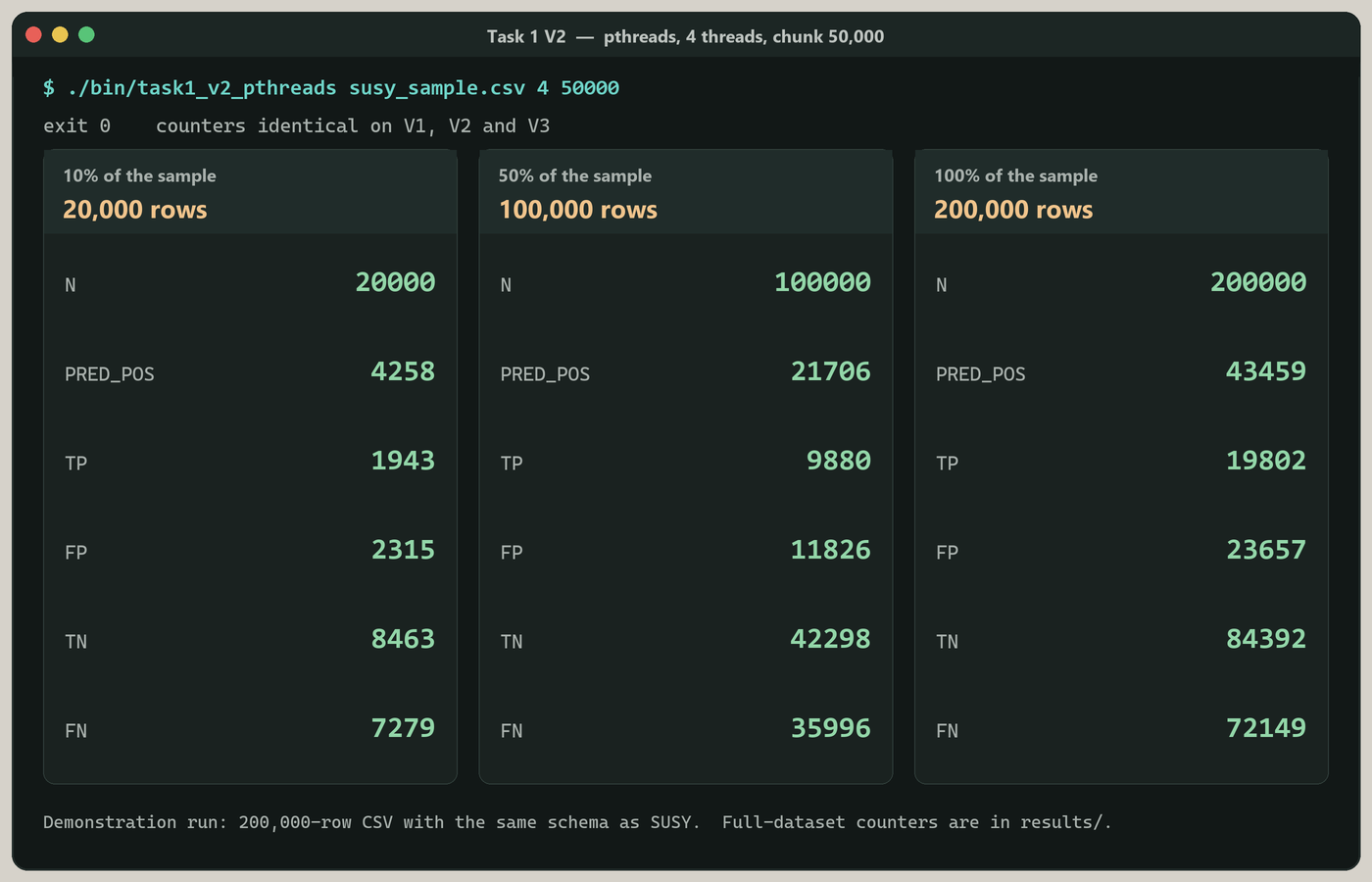
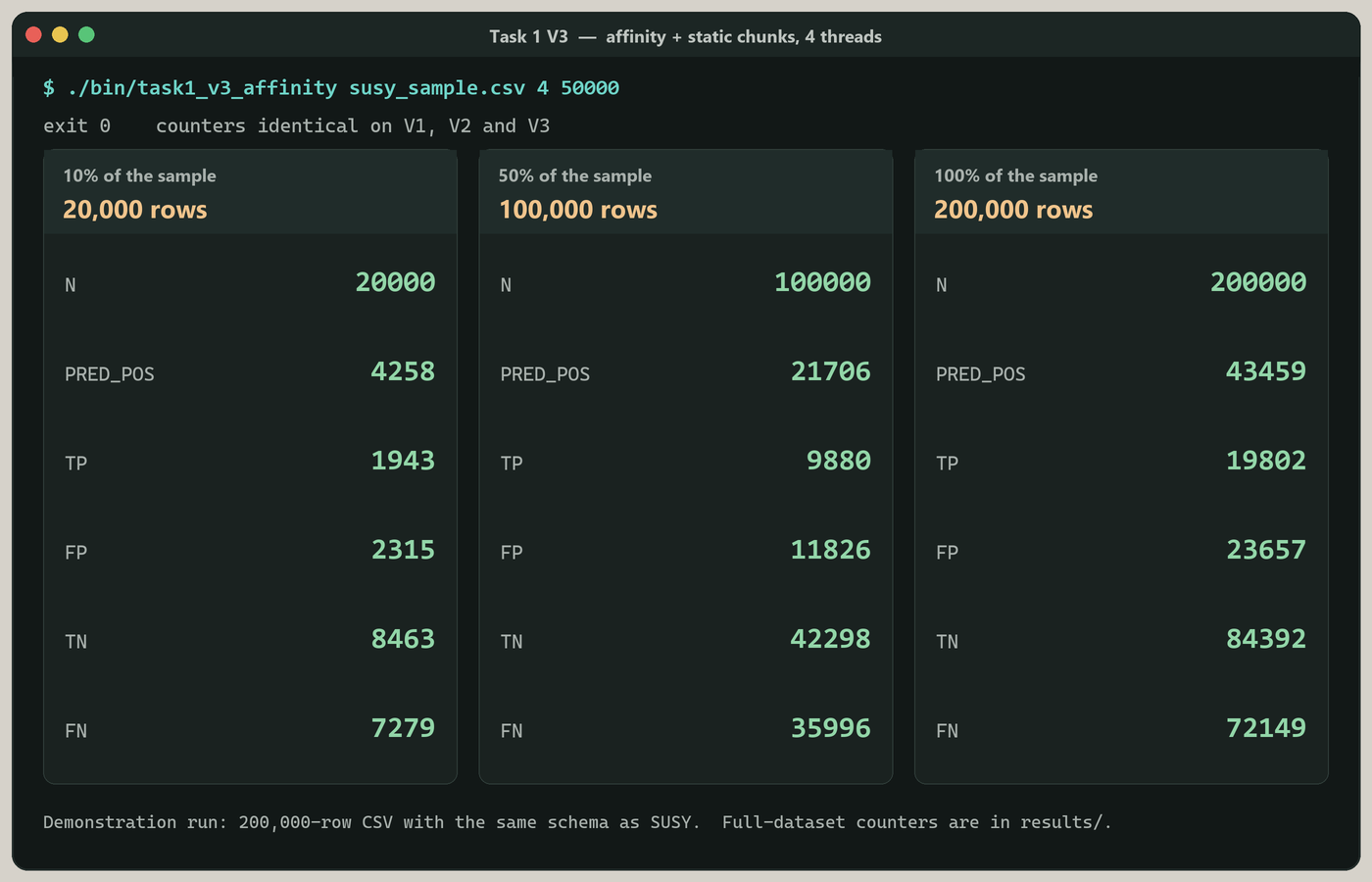
After every record is scored it prints six lines: `N`, `PRED_POS`, `TP`, `FP`, `TN`, `FN`. V2 splits records into chunks with a mutex-protected work queue. V3 assigns chunk `tid, tid+T, tid+2T, …` and pins each thread with `pthread_setaffinity_np`.
```bash
./bin/task1_v1_serial datasets/supersymmetry_dataset.csv
./bin/task1_v2_pthreads datasets/supersymmetry_dataset.csv 4 200000
./bin/task1_v3_affinity datasets/supersymmetry_dataset.csv 4 200000
```
On the full run used for the report, `N = 1,048,575`. The SUSY zip itself is a release asset — see [Large Files](#large-files-release-downloads).
---
## Task 2 – Sparse Matrix–Vector Multiply
**Files:** [`task2_v1_serial.c`](src/task2_spmv/task2_v1_serial.c), [`task2_v2_pthreads.c`](src/task2_spmv/task2_v2_pthreads.c), [`task2_v3_affinity.c`](src/task2_spmv/task2_v3_affinity.c)
The SuiteSparse `webbase-1M` matrix is a web hyperlink graph stored in Matrix Market coordinate form (`m n nz`, then `row col value` with 1-based indices). The programs:
1. Read the COO triples (a missing value is treated as `1.0`).
2. Build CSR (`row_ptr`, `col_idx`, `values`).
3. Compute `y = A x`, where `x[j] = (j mod 1000) / 1000.0` for 1-based column `j`.
4. Print a two-line signature: `M N NZ ` and `CHECKSUM ` (six decimal places).
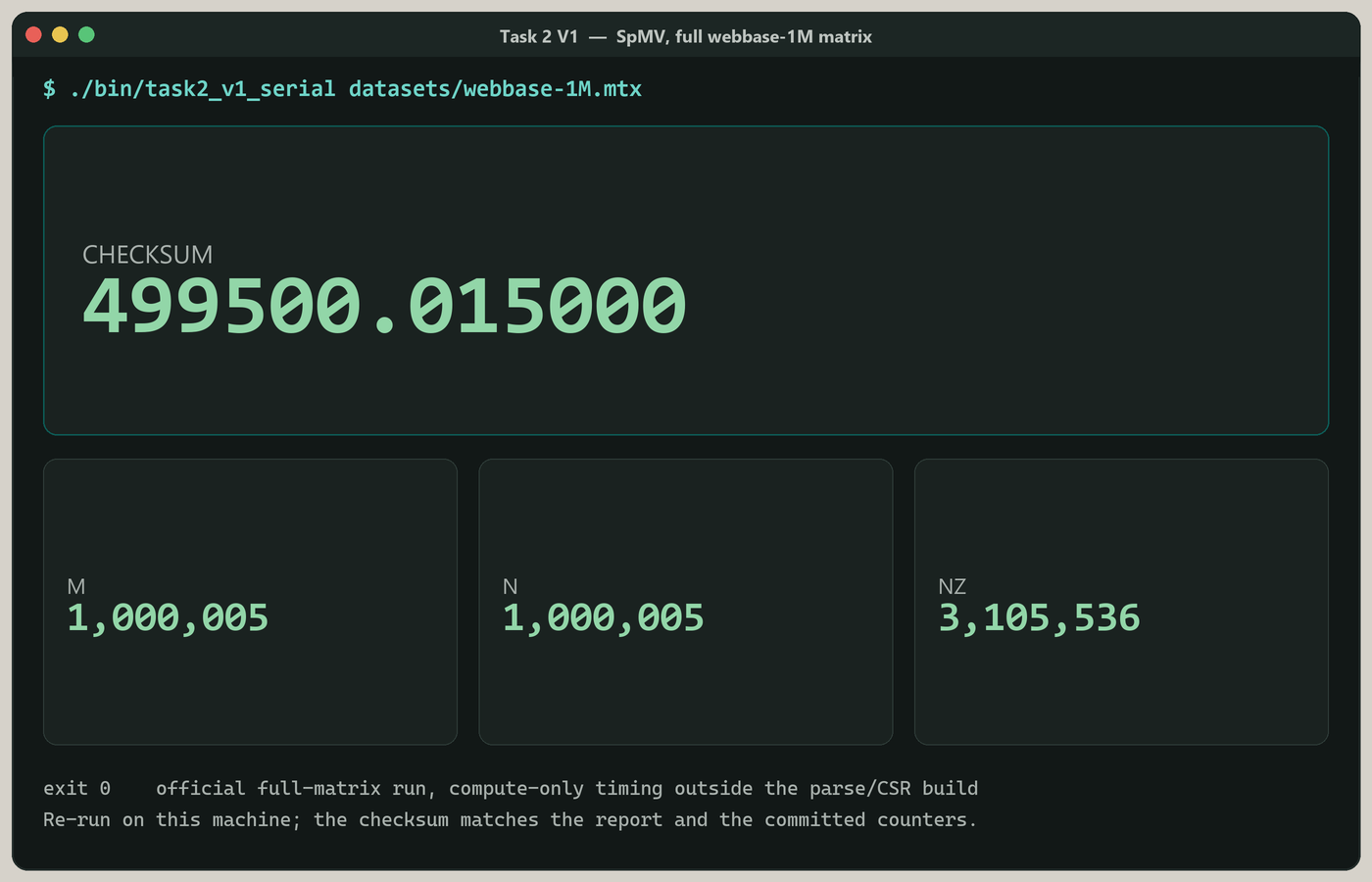
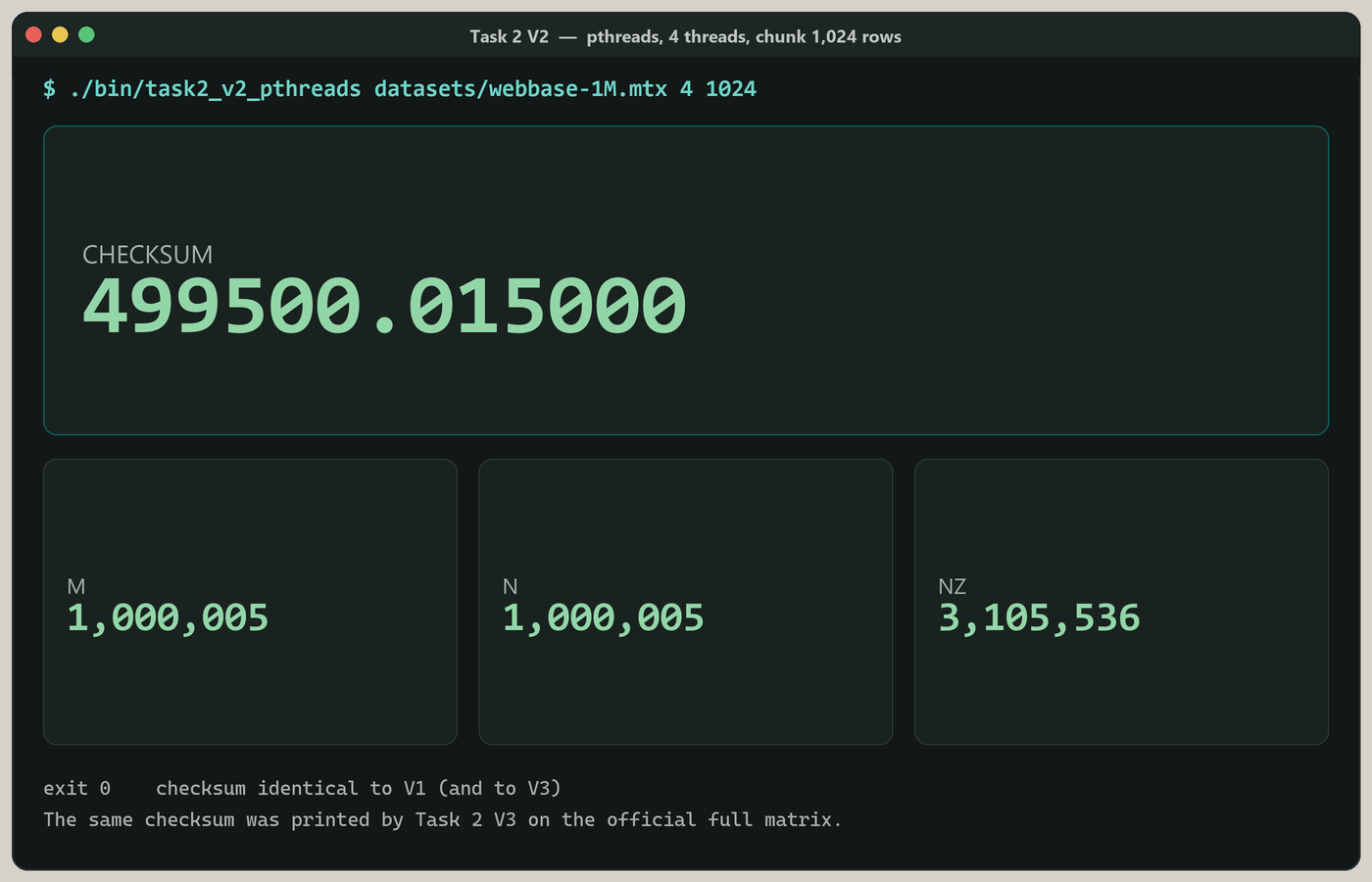
V2 and V3 parallelize over **row chunks**. The matrix on disk is `1,000,005 × 1,000,005` with `3,105,536` non-zeros. The checksum of a correct full run is `499500.015000`.
```bash
./bin/task2_v1_serial datasets/webbase-1M.mtx
./bin/task2_v2_pthreads datasets/webbase-1M.mtx 4 1024
./bin/task2_v3_affinity datasets/webbase-1M.mtx 4 1024
```
---
## Task 3 – BFS on a Web Graph
**Files:** [`task3_v1_serial.c`](src/task3_bfs/task3_v1_serial.c), [`task3_v2_pthreads.c`](src/task3_bfs/task3_v2_pthreads.c), [`task3_v3_affinity.c`](src/task3_bfs/task3_v3_affinity.c)
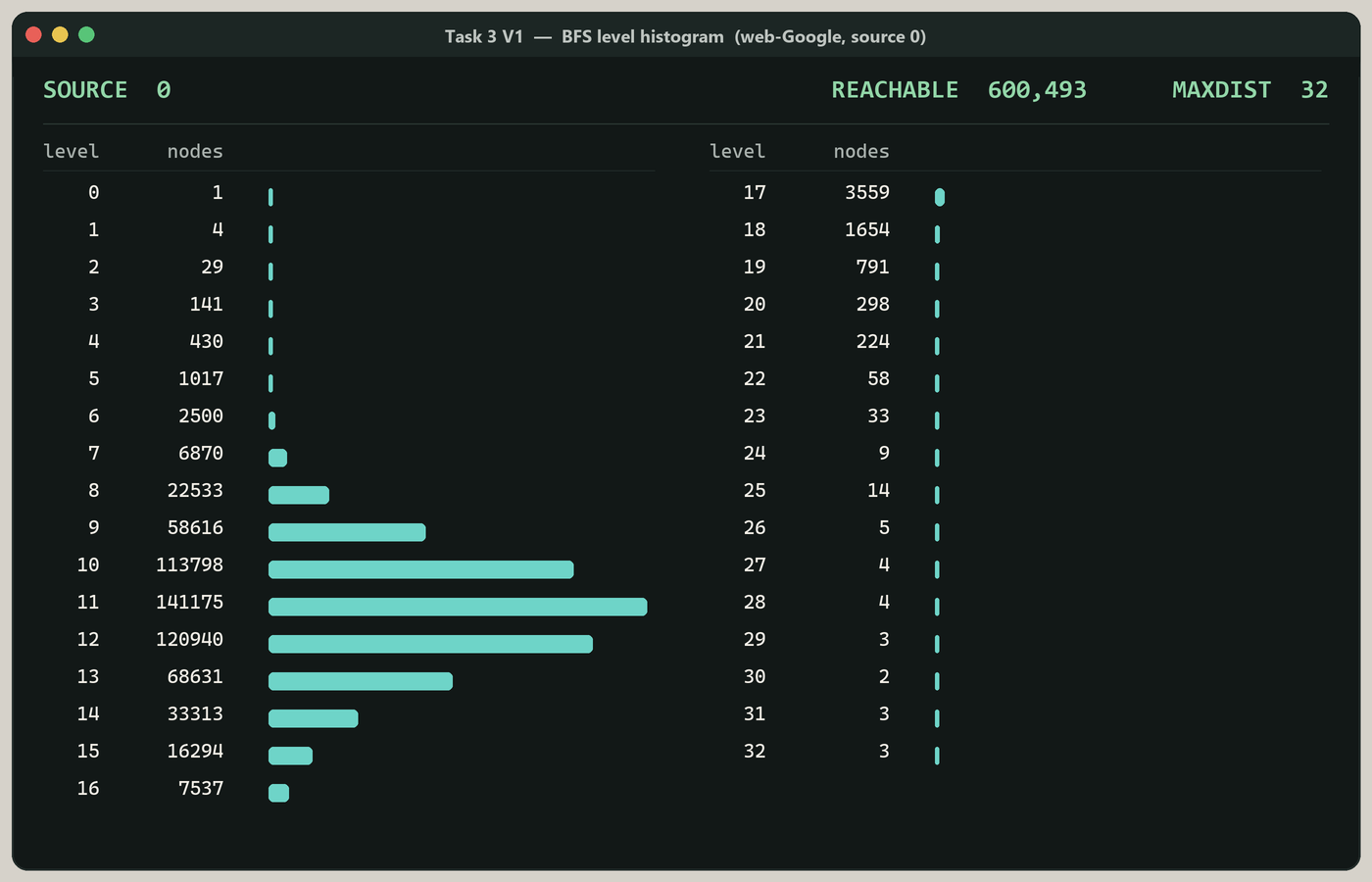
SNAP's `web-Google` file is a directed edge list (`#` comments, then `u v` pairs). The programs build a CSR adjacency list and run BFS from **source 0**, then report how many nodes are reachable, the maximum hop distance, and the number of nodes at each level.
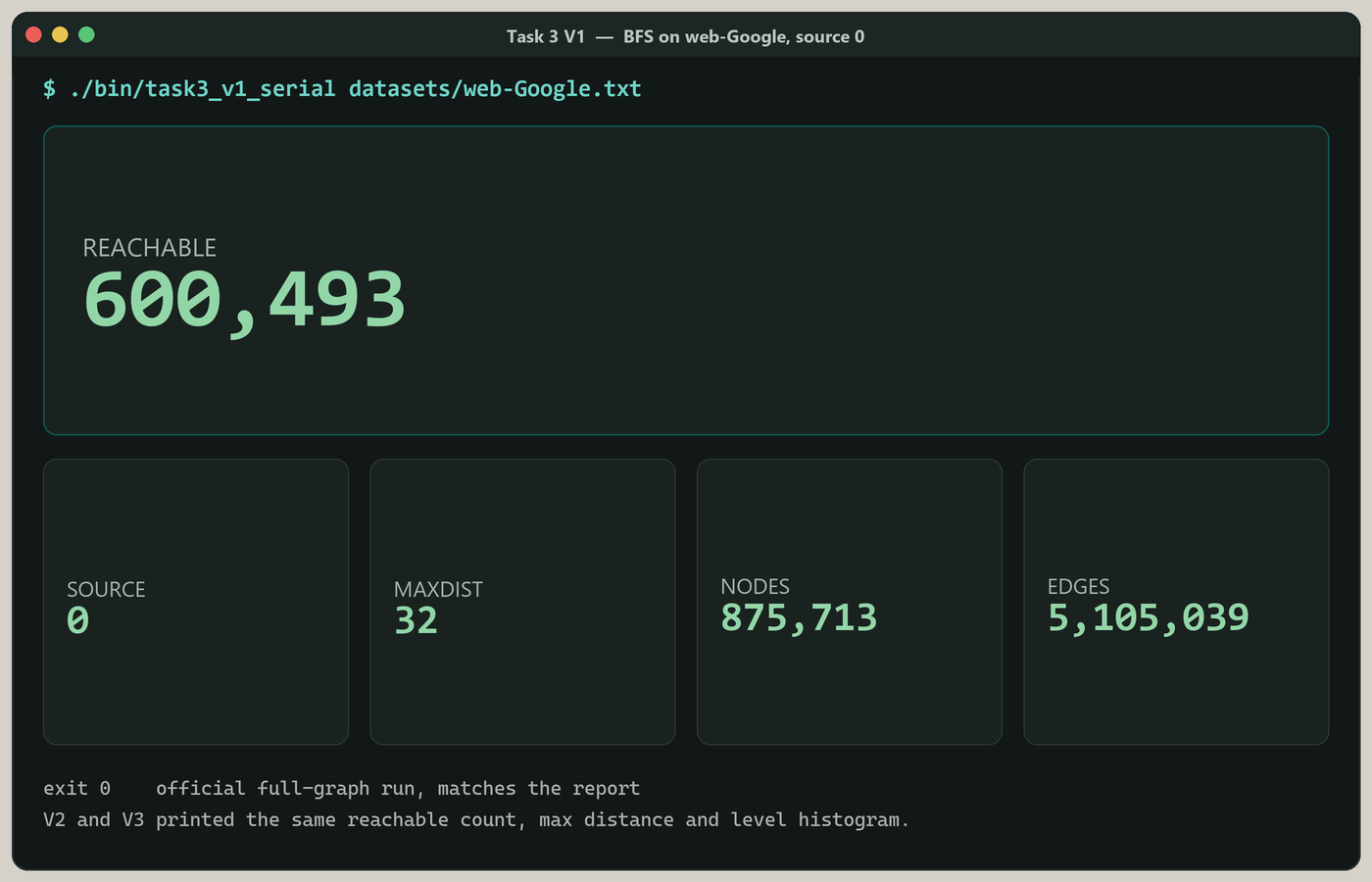
The full graph has 875,713 nodes and 5,105,039 edges. From source 0, 600,493 nodes are reachable and the farthest of those sits at distance 32.
```bash
./bin/task3_v1_serial datasets/web-Google.txt
./bin/task3_v2_pthreads datasets/web-Google.txt 4 2048
./bin/task3_v3_affinity datasets/web-Google.txt 4 2048
```
---
## Version Matrix
| | V1 | V2 | V3 |
|--|----|----|-----|
| Threads | 1 | taken from the command line | taken from the command line |
| Scheduling | — | default OS placement, dynamic chunks (mutex queue) | `pthread_setaffinity_np` + static chunks |
| Link flags | `-lm` on Tasks 1 and 2 | `-pthread -lm` | `-pthread -lm` |
| Platform | Linux / WSL | Linux / WSL | Linux / WSL (affinity is a GNU extension) |
---
## Experimental Setup
Measurements in the result workbooks and in the tables below were taken on this machine:
- **CPU:** Intel Core i5-5300U @ 2.30 GHz, 2 physical cores / 4 logical processors
- **OS / compiler:** Linux (WSL), GCC, `-O2`
- **Thread counts:** 1, 2, 3 and 4 (the machine has four logical CPUs, so 4 is the top end)
- **Chunks:** 200,000 records (Task 1), 1,024 rows (Task 2), 2,048 frontier elements (Task 3, V2/V3)
- **Sizes:** first 10%, first 50%, and 100% of each dataset, five trials each
- **Speedup:** `S = T1 / Tp` using V1 as the baseline; **efficiency:** `E = S / p`
The averages in the spreadsheet pool the three dataset sizes. The minimum is usually the 10% size, which is why `Min` sits well below `Avg`. That is how the numbers in the report were computed, and I have left them that way.
---
## Performance Results
Full trial logs and the derived tables are in each task's `results/` folder ([task1.xlsx](src/task1_susy_logistic/results/task1.xlsx), [task2.xlsx](src/task2_spmv/results/task2.xlsx), [task3.xlsx](src/task3_bfs/results/task3.xlsx)).
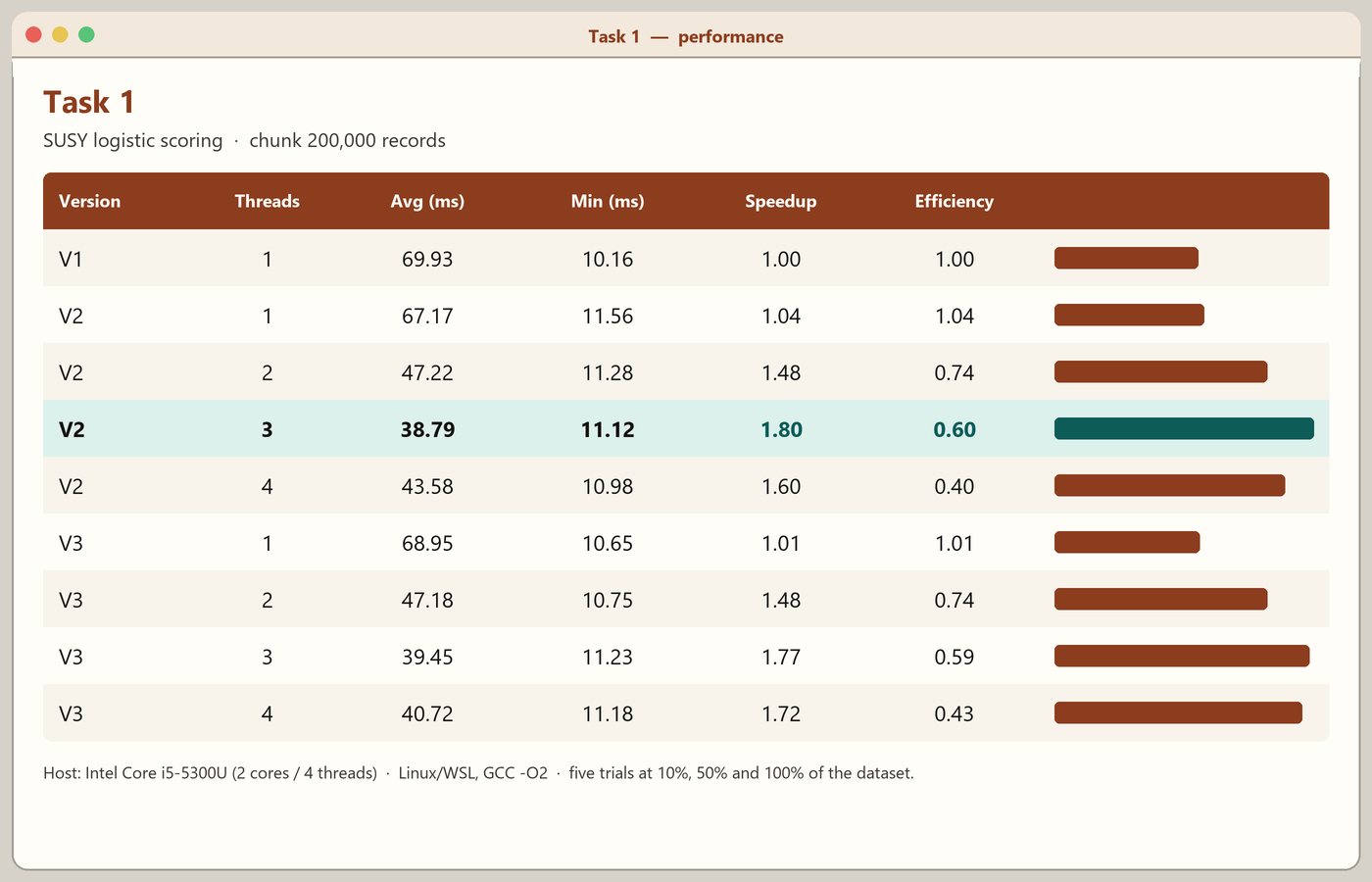
### Task 1 — SUSY scoring (chunk 200,000)
| Version | Threads | Avg (ms) | Min (ms) | Speedup | Efficiency |
|---------|---------|----------|----------|---------|------------|
| V1 | 1 | 69.93 | 10.16 | 1.00 | 1.00 |
| V2 | 1 | 67.17 | 11.56 | 1.04 | 1.04 |
| V2 | 2 | 47.22 | 11.28 | 1.48 | 0.74 |
| V2 | 3 | 38.79 | 11.12 | 1.80 | 0.60 |
| V2 | 4 | 43.58 | 10.98 | 1.60 | 0.40 |
| V3 | 1 | 68.95 | 10.65 | 1.01 | 1.01 |
| V3 | 2 | 47.18 | 10.75 | 1.48 | 0.74 |
| V3 | 3 | 39.45 | 11.23 | 1.77 | 0.59 |
| V3 | 4 | 40.72 | 11.18 | 1.72 | 0.43 |
The kernel is arithmetic over a dense float array, so two and three threads help. At four threads we are on simultaneous multithreading of the same two cores, and efficiency drops — the 4-thread V2 average is actually a little slower than the 3-thread one.
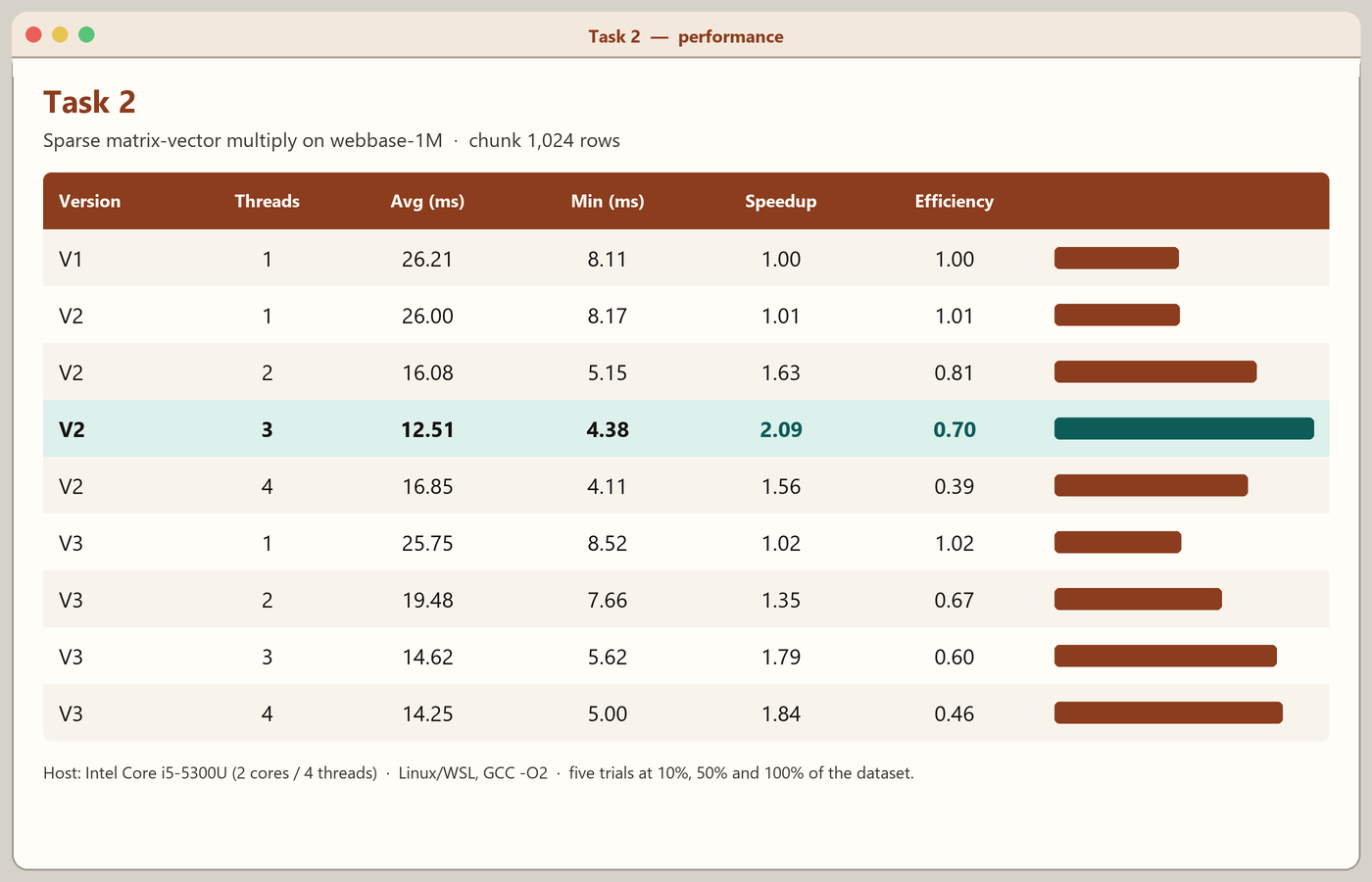
### Task 2 — SpMV (chunk 1,024 rows)
| Version | Threads | Avg (ms) | Min (ms) | Speedup | Efficiency |
|---------|---------|----------|----------|---------|------------|
| V1 | 1 | 26.21 | 8.11 | 1.00 | 1.00 |
| V2 | 1 | 26.00 | 8.17 | 1.01 | 1.01 |
| V2 | 2 | 16.08 | 5.15 | 1.63 | 0.81 |
| V2 | 3 | 12.51 | 4.38 | 2.09 | 0.70 |
| V2 | 4 | 16.85 | 4.11 | 1.56 | 0.39 |
| V3 | 1 | 25.75 | 8.52 | 1.02 | 1.02 |
| V3 | 2 | 19.48 | 7.66 | 1.35 | 0.67 |
| V3 | 3 | 14.62 | 5.62 | 1.79 | 0.60 |
| V3 | 4 | 14.25 | 5.00 | 1.84 | 0.46 |
SpMV is memory-heavy. The best average speedup here is about 2.1× at three V2 threads. Four threads again run into the two-core, four-thread ceiling and into cache and bandwidth limits on a sparse row walk.
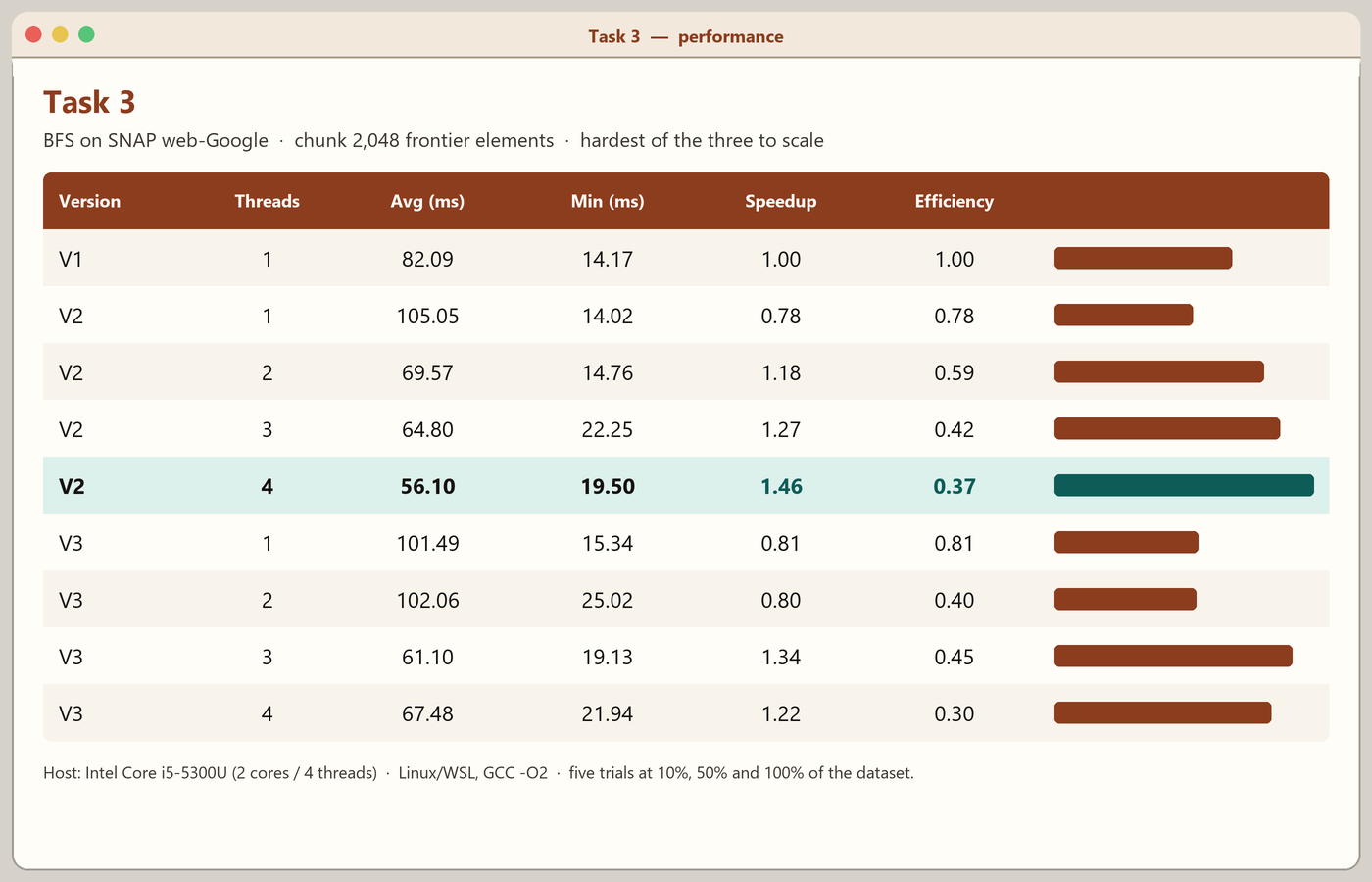
### Task 3 — BFS (chunk 2,048)
| Version | Threads | Avg (ms) | Min (ms) | Speedup | Efficiency |
|---------|---------|----------|----------|---------|------------|
| V1 | 1 | 82.09 | 14.17 | 1.00 | 1.00 |
| V2 | 1 | 105.05 | 14.02 | 0.78 | 0.78 |
| V2 | 2 | 69.57 | 14.76 | 1.18 | 0.59 |
| V2 | 3 | 64.80 | 22.25 | 1.27 | 0.42 |
| V2 | 4 | 56.10 | 19.50 | 1.46 | 0.37 |
| V3 | 1 | 101.49 | 15.34 | 0.81 | 0.81 |
| V3 | 2 | 102.06 | 25.02 | 0.80 | 0.40 |
| V3 | 3 | 61.10 | 19.13 | 1.34 | 0.45 |
| V3 | 4 | 67.48 | 21.94 | 1.22 | 0.30 |
BFS is the awkward one. A single extra thread can be slower than the serial code because of frontier synchronization, and even the best figure here is only about 1.5×. That matches what the graph looks like: irregular neighbours, changing frontier size, and a lot of pointer chasing.
---
## Profiling with gprof
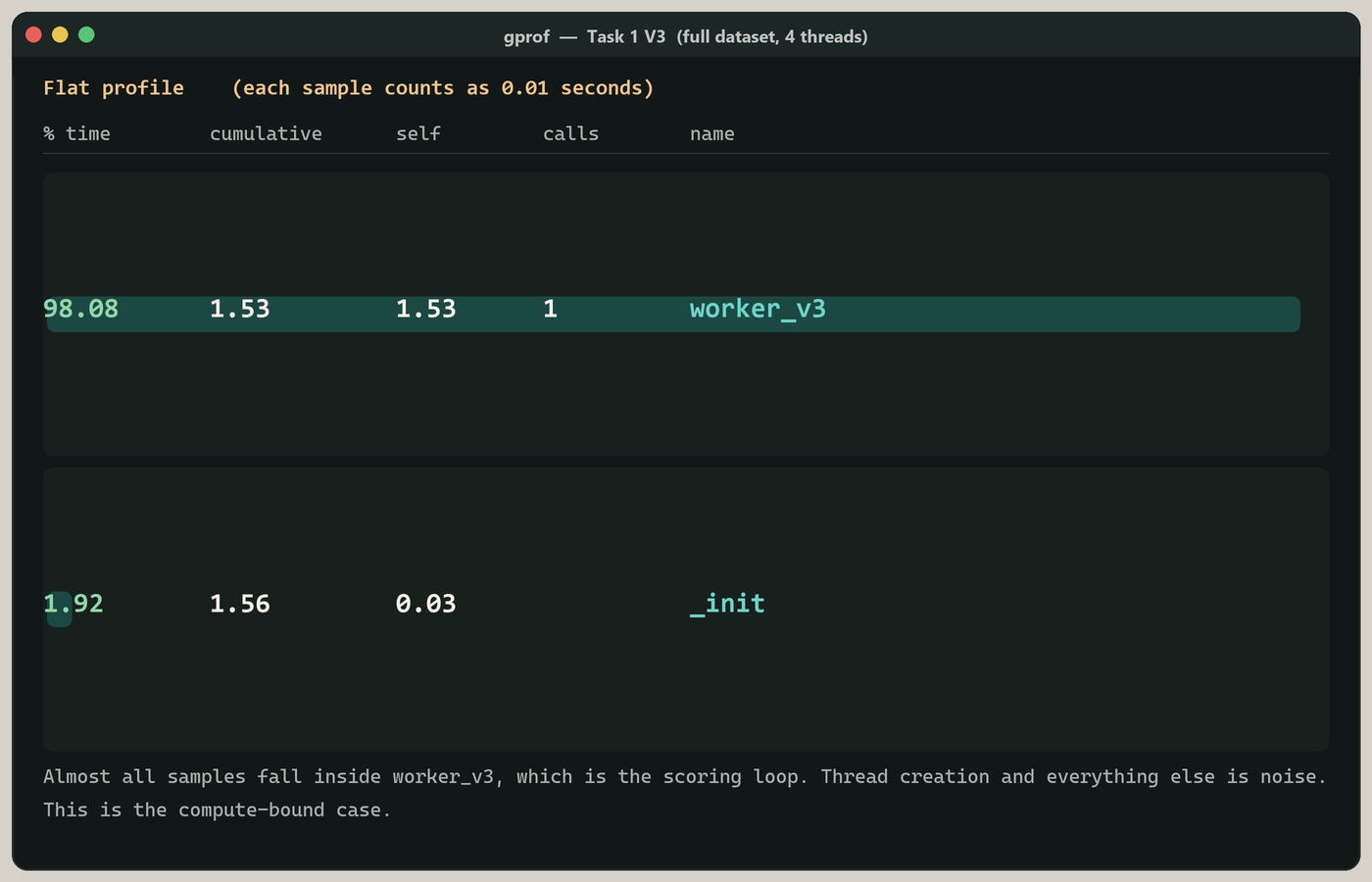
Each V3 program was also built with `-pg` and profiled on the full dataset at four threads. The flat-profile summaries (full dumps are in the task folders):
| Task | Hottest function | Share of samples | Next |
|------|------------------|------------------|------|
| 1 | `worker_v3` | 98.1% | `_init` 1.9% |
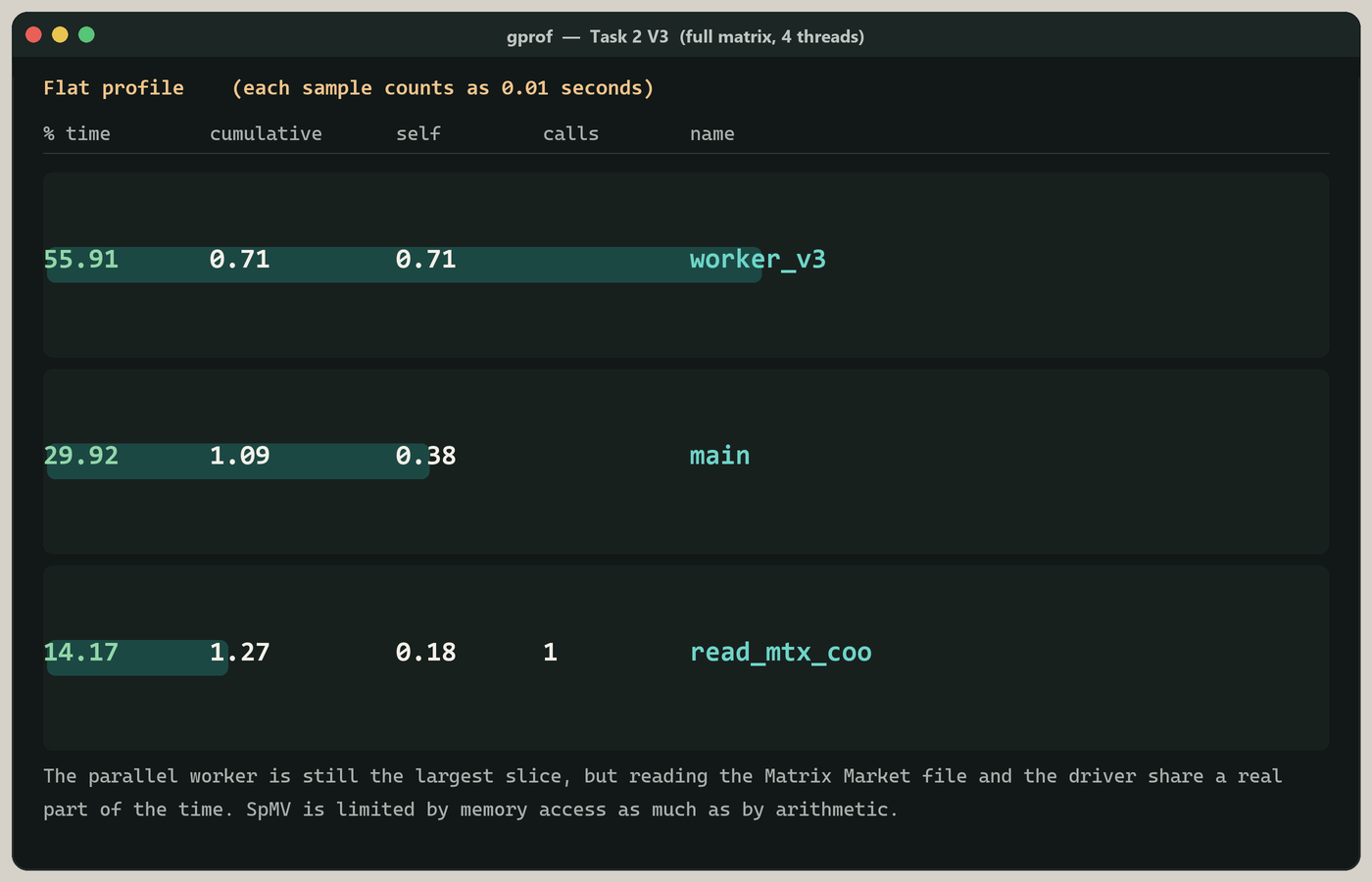
| 2 | `worker_v3` | 55.9% | `main` 29.9%, `read_mtx_coo` 14.2% |
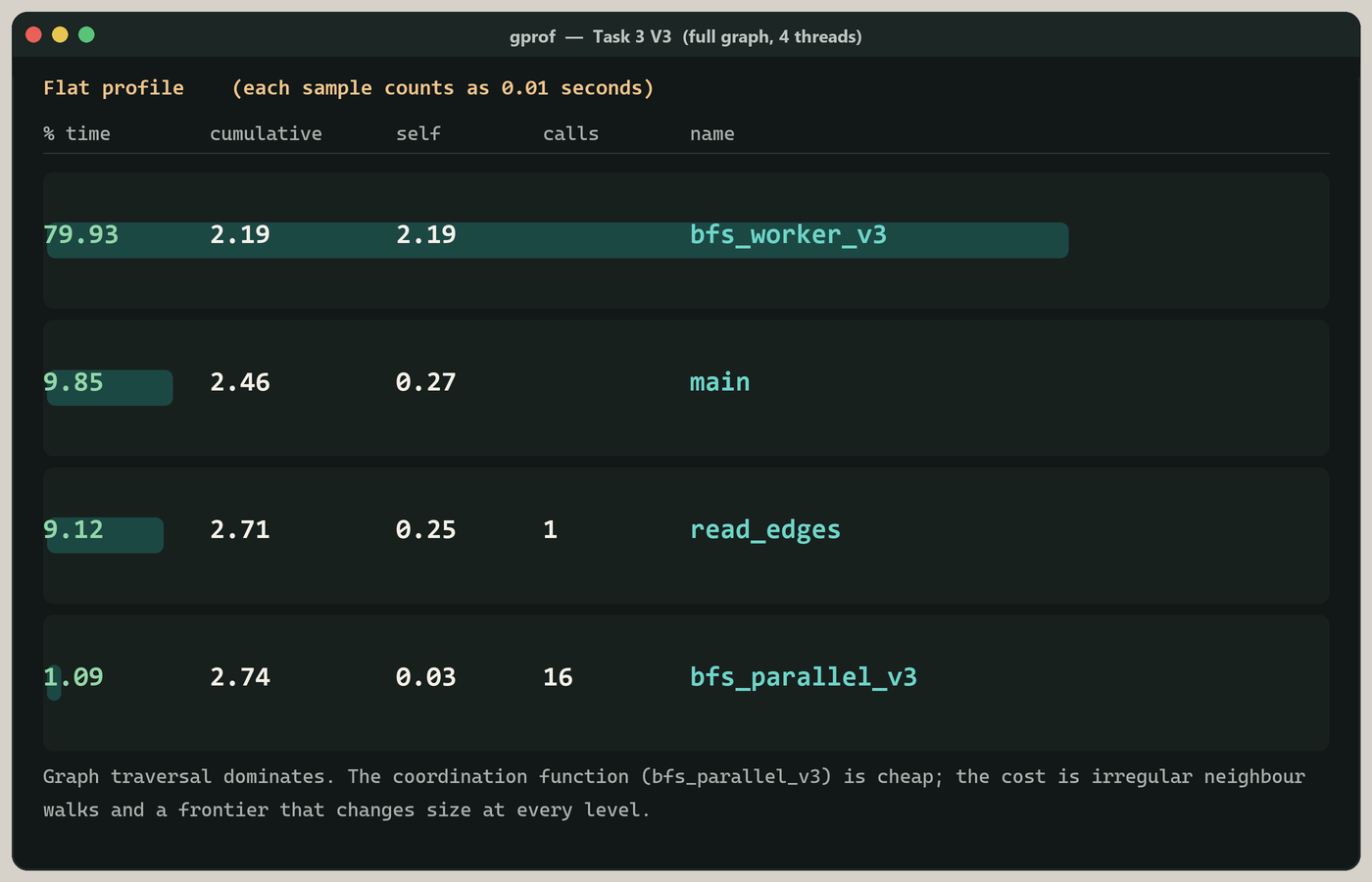
| 3 | `bfs_worker_v3` | 79.9% | `main` 9.9%, `read_edges` 9.1% |
Task 1 really does spend almost all of its time in the scoring loop. Task 2 and Task 3 spend a visible fraction in parsing and in the driver, which is one reason their speedups are smaller — and Task 2 in particular is walking CSR rows that do not sit nicely in cache.
---
## Correctness
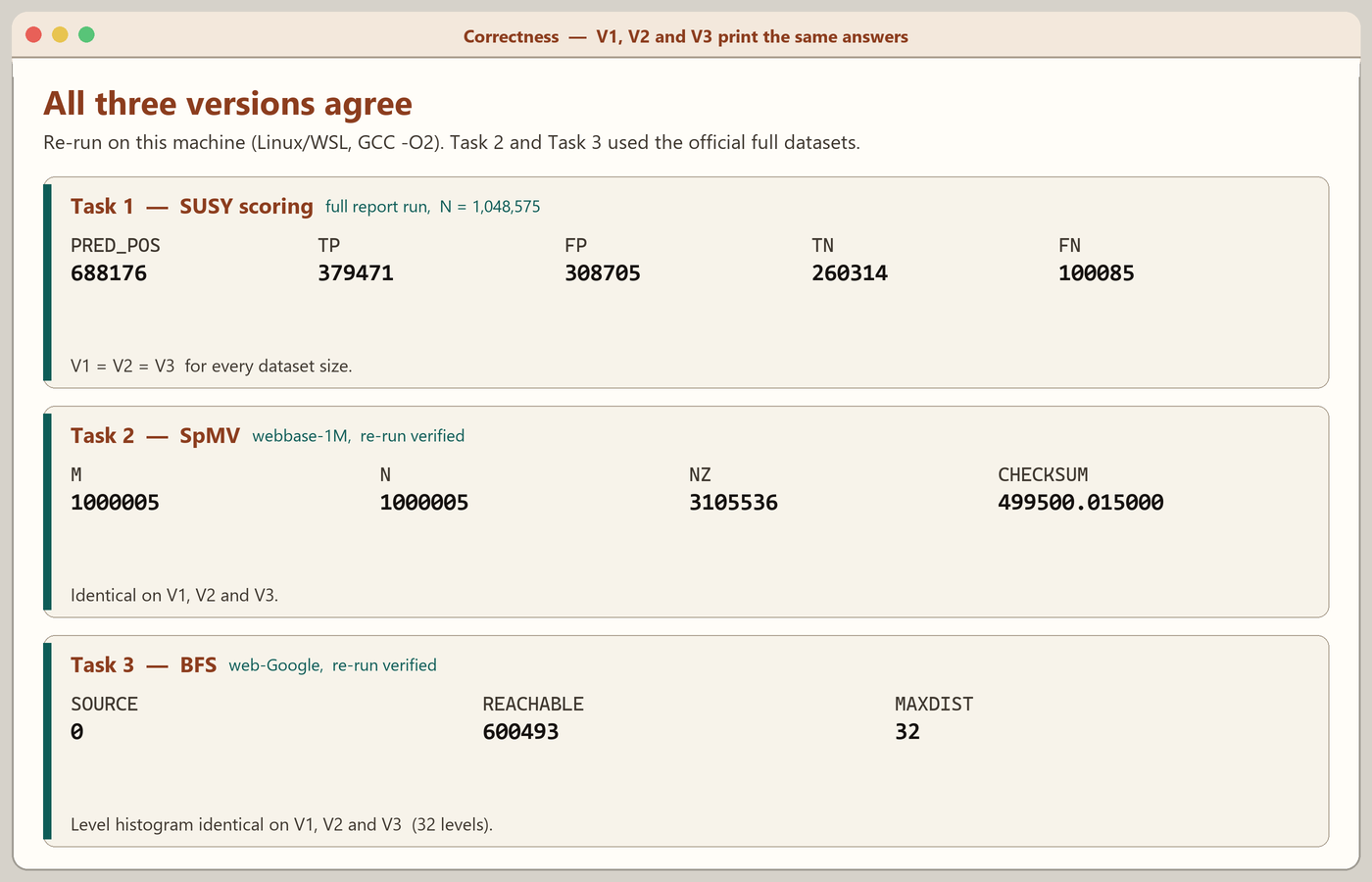
V2 and V3 are required to print the same answers as V1. They did, on every dataset size.
**Task 1** (full input used in the report, `N = 1,048,575`):
```
PRED_POS 688176
TP 379471
FP 308705
TN 260314
FN 100085
```
**Task 2:**
```
M 1000005 N 1000005 NZ 3105536
CHECKSUM 499500.015000
```
**Task 3:**
```
SOURCE 0
REACHABLE 600493
MAXDIST 32
```
The same figures are in the counter files under each `results/` folder and in [the report](assignment/Report_22I-2327_Section_F.pdf). I also re-ran Task 2 V1 against the unpacked `webbase-1M.mtx` while putting this repository together; the checksum matched.
---
## Large Files (Release Downloads)
GitHub does not allow files bigger than 100 MB inside a repository, so the SUSY dataset archive is kept out of the git tree. Locally it belongs in the [`release/`](release/README.md) folder, ready to attach when I publish a GitHub Release. The two smaller dataset archives stay in [`datasets/`](datasets/).
| Local folder | File | Size | After the release is published |
|--------------|------|------|--------------------------------|
| `release/` | SUSY.zip | ~799 MB | [SUSY.zip](https://github.com/rohaan2802/Multithreading/releases/download/v1.0/SUSY.zip) |
The same dataset is also available from the [UCI SUSY page](https://archive.ics.uci.edu/dataset/279/susy). A short note on how to unpack everything is in [`datasets/README.md`](datasets/README.md) and [`release/README.md`](release/README.md).
---
## Folder Structure
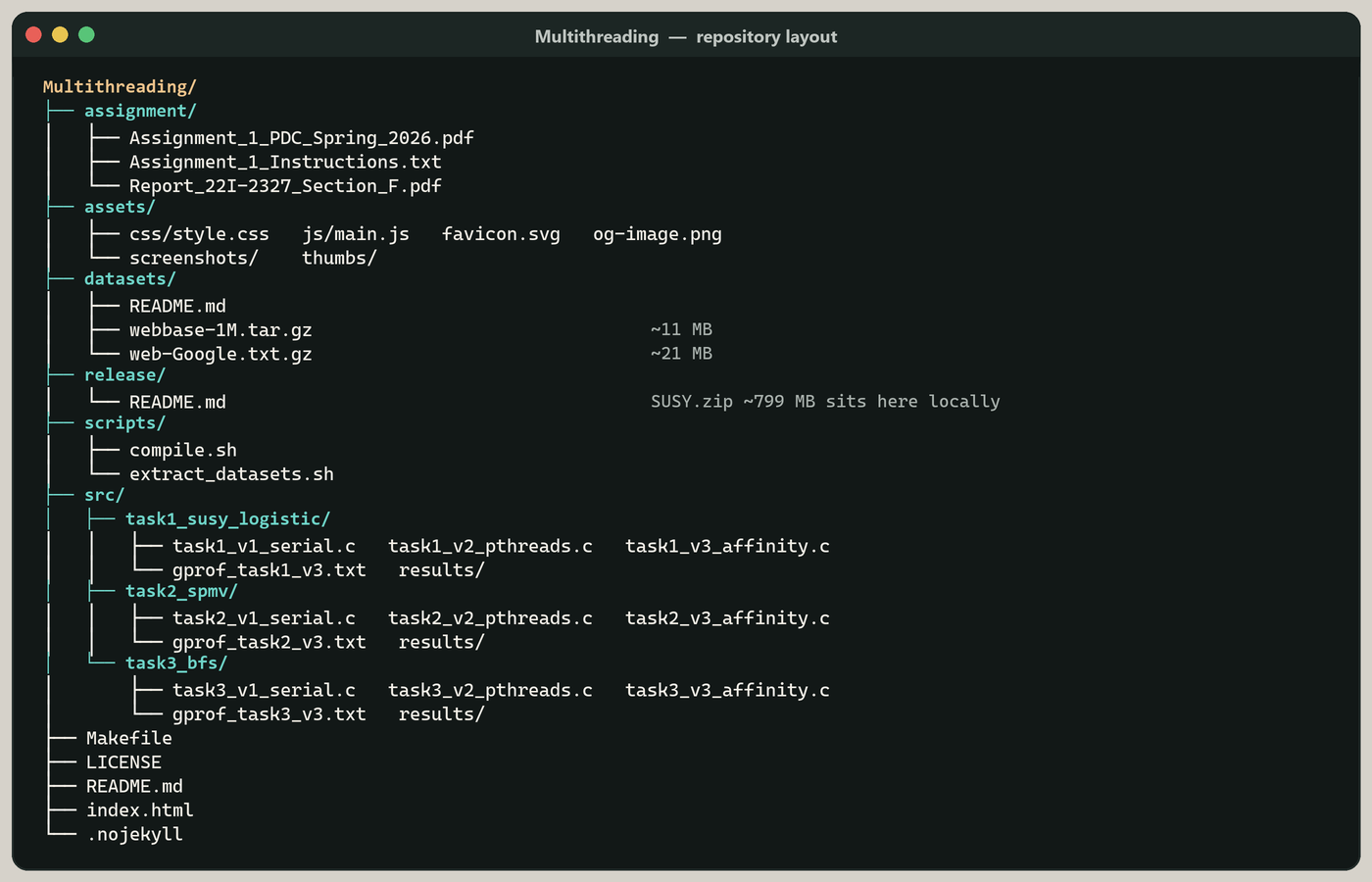
```
Multithreading/
├── assignment/
│ ├── Assignment_1_PDC_Spring_2026.pdf (official brief)
│ ├── Assignment_1_Instructions.txt
│ └── Report_22I-2327_Section_F.pdf (my report)
├── assets/
│ ├── css/style.css
│ ├── js/main.js
│ ├── screenshots/ (images used in this README)
│ ├── thumbs/
│ ├── favicon.svg
│ └── og-image.png
├── datasets/
│ ├── README.md
│ ├── webbase-1M.tar.gz
│ └── web-Google.txt.gz
├── release/
│ └── README.md (SUSY.zip sits here locally; it is not committed)
├── scripts/
│ ├── compile.sh
│ └── extract_datasets.sh
├── src/
│ ├── task1_susy_logistic/
│ │ ├── task1_v1_serial.c
│ │ ├── task1_v2_pthreads.c
│ │ ├── task1_v3_affinity.c
│ │ ├── gprof_task1_v3.txt
│ │ └── results/
│ ├── task2_spmv/
│ │ ├── task2_v1_serial.c
│ │ ├── task2_v2_pthreads.c
│ │ ├── task2_v3_affinity.c
│ │ ├── gprof_task2_v3.txt
│ │ └── results/
│ └── task3_bfs/
│ ├── task3_v1_serial.c
│ ├── task3_v2_pthreads.c
│ ├── task3_v3_affinity.c
│ ├── gprof_task3_v3.txt
│ └── results/
├── Makefile
├── LICENSE
├── README.md
├── index.html
└── .nojekyll
```
---
## How to Use This Repository
1. **Browse online** — the [website](https://rohaan2802.github.io/Multithreading/) has the same material with a dark/light theme. On GitHub, PDFs open in the browser.
2. **Clone the repository:**
```bash
git clone https://github.com/rohaan2802/Multithreading.git
cd Multithreading
```
3. **Unpack the Task 2 and Task 3 datasets:**
```bash
bash scripts/extract_datasets.sh
```
4. **Get SUSY for Task 1** from [`release/`](release/README.md) once it is on the Releases page, or from [UCI](https://archive.ics.uci.edu/dataset/279/susy), and unzip the CSV.
5. **Build and run** as below. This is Linux/WSL work: V3 calls `pthread_setaffinity_np`.
---
## Compiling and Running
You need `gcc` with pthreads (the GCC that ships with Ubuntu on WSL is enough). From the repository root:
```bash
make
# or: bash scripts/compile.sh
```
That writes nine binaries into `bin/`. Manual commands, if you would rather not use the Makefile:
```bash
# Task 1
gcc src/task1_susy_logistic/task1_v1_serial.c -O2 -lm -o bin/task1_v1_serial
gcc src/task1_susy_logistic/task1_v2_pthreads.c -O2 -lm -pthread -o bin/task1_v2_pthreads
gcc src/task1_susy_logistic/task1_v3_affinity.c -O2 -lm -pthread -o bin/task1_v3_affinity
# Task 2
gcc src/task2_spmv/task2_v1_serial.c -O2 -lm -o bin/task2_v1_serial
gcc src/task2_spmv/task2_v2_pthreads.c -O2 -lm -pthread -o bin/task2_v2_pthreads
gcc src/task2_spmv/task2_v3_affinity.c -O2 -lm -pthread -o bin/task2_v3_affinity
# Task 3
gcc src/task3_bfs/task3_v1_serial.c -O2 -o bin/task3_v1_serial
gcc src/task3_bfs/task3_v2_pthreads.c -O2 -pthread -o bin/task3_v2_pthreads
gcc src/task3_bfs/task3_v3_affinity.c -O2 -pthread -o bin/task3_v3_affinity
```
Each program appends timing rows to `results/taskN.csv` relative to the current working directory, so it helps to `mkdir -p results` first, or to run from a throwaway folder and pass absolute paths to the datasets.
A gprof build looks like this:
```bash
gcc src/task1_susy_logistic/task1_v3_affinity.c -O2 -pg -lm -pthread -o bin/task1_v3_pg
./bin/task1_v3_pg datasets/supersymmetry_dataset.csv 4 200000
gprof ./bin/task1_v3_pg gmon.out > gprof_task1_v3.txt
```
---
## Screenshots
### 1. Repository Folder Structure
### 2. Task 1 V1 – Serial Scoring Output
### 3. Task 1 V2 – Pthreads Output (same counters as V1)
### 4. Task 1 V3 – Affinity Output (same counters as V1)
### 5. Task 2 V1 – SpMV on webbase-1M
### 6. Task 2 V2 – Parallel SpMV (matching checksum)
### 7. Task 3 V1 – BFS Reachability from Node 0
### 8. Task 3 – Distance-Level Histogram
### 9. Task 1 – Runtime, Speedup and Efficiency
### 10. Task 2 – Runtime, Speedup and Efficiency
### 11. Task 3 – Runtime, Speedup and Efficiency
### 12. gprof – Task 1 V3 Flat Profile
### 13. gprof – Task 2 V3 Flat Profile
### 14. gprof – Task 3 V3 Flat Profile
### 15. Assignment Brief – Official Task Description
### 16. V3 Source – CPU Affinity and Static Chunks
### 17. Task 2 Source – CSR SpMV Kernel
### 18. Correctness – Identical Results Across V1, V2 and V3
---
## License
The C programs I wrote are under the [MIT License](LICENSE). The assignment brief belongs to the course instructors at FAST-NUCES. The datasets belong to their original publishers (UCI, the SuiteSparse Matrix Collection, and SNAP). They are here only so the programs can be run and the work can be checked. If you are an owner and want something removed, please open an [issue](https://github.com/rohaan2802/Multithreading/issues).
---
## Author
**Mohammad Rohaan**
BS Computer Science – FAST-NUCES
Roll 22I-2327 · Section F
- GitHub: [@rohaan2802](https://github.com/rohaan2802)
- Email: [m.rohaanarshad@gmail.com](mailto:m.rohaanarshad@gmail.com)
If this was useful, a star on the repo is appreciated.